
Workflow Automation: Build a Reliable First AI Workflow
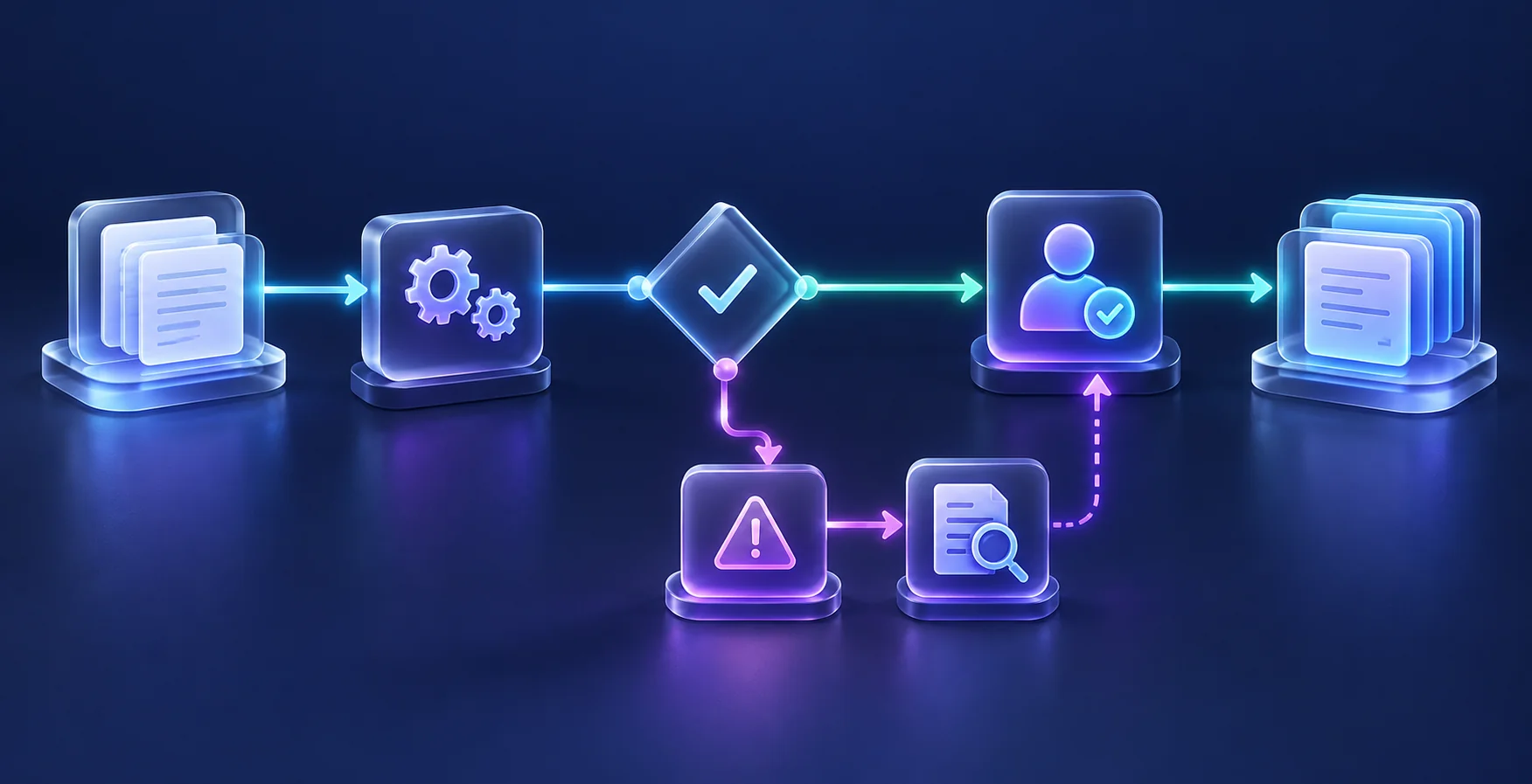
Quick answer: A reliable AI workflow combines explicit business rules with a narrowly defined AI task, input validation, human review where needed, and a recovery path. Start with one complete process and test failures as carefully as successful runs.
Build an Autopilot lane, not a loose chain of prompts
The exciting part of AI Autopilot is continuity. A request arrives, the system understands it, the appropriate task appears and the next person has the context they need. You stop copying the same information between tabs. For a small service business, that can mean a cleaner morning handoff; for an individual contributor, it can mean research and meeting preparation arriving in a consistent format.
Design the workflow as a state machine: received, validated, prepared, approved, completed or failed. Each item should have one current state and a unique identifier. This simple structure answers the question that a long prompt cannot: what has already happened, and what should happen next? It also makes recovery easier when a provider times out halfway through a run.
Use a structured output contract for the AI step. For example, require request_type, location, requested_date and missing_information. Check values before using them. A confident sentence is not a valid booking instruction. Keep customer text in a clearly marked input field, separate from the instructions controlling the workflow, and never give that text permission to change recipients or approve actions.
Give every failed step an owner and a next action. Decide when to retry, when to stop and which records staff need to investigate the problem. These are operating requirements to agree with your implementation partner, whichever platform you use.
Test the exceptions before launch
Create a small test matrix: normal inquiry, duplicate submission, missing field, unsupported service, unreadable attachment, and disconnected CRM. Define the expected outcome for each. Check that an AI response outside the allowed format cannot trigger a downstream action.
Illustrative example: A field service company receives a message that mentions both a routine inspection and an urgent issue. The safe operational response is a flagged staff task using the company’s existing escalation procedure. Do not let a language model invent emergency advice or imply that an appointment is confirmed.
Run in review mode first. Compare proposed actions with what staff would do, then expand only the actions that pass your checks. Preserve a manual route while the pilot is being evaluated.
Maintain the workflow after handover
Assign an owner and document where connections, templates, and routing rules are maintained. Keep logs proportionate and avoid retaining unnecessary personal information. Set a review interval for failed runs, staff corrections, and changes in input patterns.
Track completed requests, exception rate, duplicate actions, and time spent reviewing. More automated runs are not automatically better. The goal is dependable completion with less total effort. For the project-selection step, start with an AI readiness assessment.
Your first week: turn the idea into evidence
Choose ten representative examples from the task you want to improve, using synthetic or appropriately approved information. Write down the expected result for each before testing. Include one incomplete request, one duplicate and one request outside the intended scope. Time the complete task, including checking and correction, rather than the generation step alone.
Review the results with the person who owns the work. Identify which errors come from unclear instructions, missing source information or an unreliable connection. Change one issue at a time and repeat the relevant examples. Leave the week with a specific decision: continue the pilot, repair the process first or stop. This produces useful evidence even when the first idea is not ready for automation.
Completion rate: did the work reach the finish line?
Completion rate means the share of valid requests that reach the intended result. If 100 inquiries enter a workflow and 92 become usable, correctly assigned tasks, the completion rate is 92%. The eight unfinished items still need an owner. A dashboard showing “100 AI responses generated” would hide this problem because generating text is not the same as finishing the business task.
Look at a failed item from beginning to end. Did the customer omit information? Did AI misunderstand it? Did the CRM reject a field? Those are different problems with different fixes. Better form instructions may solve the first, examples may improve the second, and integration repair may resolve the third. Buying a more powerful AI model will not necessarily repair a broken connection.
Set your target around the task and the consequences rather than copying a percentage from another business. Review how long exceptions take as well as how many occur. One difficult failure can consume the time saved on many successful runs. The useful outcome is a dependable queue of completed work plus an understandable queue of items a person must handle.
Frequently asked questions
Does every workflow need AI?
No. Use ordinary rules for predictable steps. AI is useful when the task involves variable language or information that cannot be handled economically with simple rules.
Who handles a failed run?
Name a business owner and backup before launch. Alerts should include enough context to recover the request without exposing unnecessary customer information.
What should we measure first?
Measure end-to-end completion, review time, and errors. These show whether the workflow improves the process rather than merely moving work to another person.
What is a trigger?
A trigger is the event that starts the process, such as receiving a form submission or adding a document to an approved folder.
What is a workflow exception?
It is a case the normal process cannot complete confidently. Send it to a named person with enough information to resolve it.
Why do duplicate checks matter?
Connections can repeat events. A stable request reference helps prevent duplicate CRM records, tasks and messages.
Can the workflow send messages automatically?
Only enable a defined message type after reviewing permissions, templates and test results. Begin with drafts if the conditions remain uncertain.
What happens when a connection fails?
Use a bounded recovery process, retain the request reference and alert the responsible person when automatic recovery cannot finish.
How do we turn Autopilot off?
Provide an accessible stop control and a manual route for pending work. Test both before using the workflow with live requests.
What makes a workflow worth expanding?
Look for useful net time savings, acceptable completion quality and an exception workload the team can sustain.
Choose a practical next step
Explore AI Automation or request a free consultation. Bring one workflow, the systems involved, and the outcome you want to improve. A focused starting point makes the scope and success measures easier to agree.

Get practical AI adoption, automation and growth insights delivered to your inbox.
Weekly insights
No spam
Unsubscribe anytime
Practical AI and growth insights from eMarketLift. Subscribe for future articles.